A free Security program for Windows
Protecting your files in this digital world is an absolute necessity nowadays. One unsavory program might lead to your entire digital work being blown up in smoke. However, sometimes viruses work in more clandestine ways. You might not know your machine has been infected unless you really keep an eye on what’s happening to the files on your system. Thankfully, FingerPrint by 2brightsparks provides you with a way to keep track of the changes that are happening in your computer.
Top Recommended Alternative

No-nonsense Simplicity
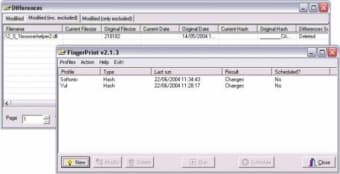
FingerPrint is a software that’s all about simplicity. It was very easy to install. There were no unnecessary steps, installations, or downloads. In just a few seconds, the program will be up and running. The interface of the program is also quite simple. It has no superfluous decorations that only serve to distract the users from its purpose. Its design is no-nonsense and it gets straight to the point.
The only thing in the interface is a window where the profiles and results are displayed. You can sort the profiles by type, last run, result, and whether it’s scheduled or not. Below that window are buttons to perform actions such as creating a new profile, modifying profiles, deleting profiles, running scans, scheduling scans, and closing the program. There are also menus at the top but they just repeat the actions of the buttons below.
Fast and Efficient
The program performs most of its task quickly and efficiently. What’s great about it is that the software doesn’t take up a lot of machine resources to perform its task. You can still perform other tasks while it scans your folders. Creating new profiles is an incredibly helpful feature that allows users to create a quick shortcut to the most important folders that need to be scanned often. Creating a new profile isn’t difficult at all. There are a lot of additional options that the users can modify in order to scan their files with more accuracy. With more files, it does take a little bit more time, but as mentioned before, it’s not that big of a deal. FingerPrint also has a scheduling feature that allows users to scan their files automatically.
Is It Necessary?
Probably the biggest question regarding this program is whether or not it’s really a necessary program to have. All it does is let users know if their files have been changed or not. It doesn’t have any other function than that. Honestly, it may not be necessary, but it’s also not worthless. It can be helpful to know if your files are being modified. With the scheduling feature, you won’t have to go out of your way to do it.
Useful in Very Specific Circumstances
All in all, FingerPrint is a program with one very specific function: to look for any unwanted changes in your files. It may not be a useful program in any other circumstance, but if you feel like you need extra protection and security, there’s no harm in giving it a try. After all, it’s completely free!